CTRLpad

Mac · iPad · iPhone

Your Mac's buttons, under your thumb.

A control pad for your Mac, on an iPhone or an iPad. Lay out a deck on the Mac — buttons, toggles, sliders, knobs, a piano, the apps that are open — and it is on the pad a moment later. A press opens an app, sends a key chord, runs a command, moves the volume or plays a note. No hardware to buy. That is CTRLpad.

  • · no account
  • · no server
  • · paired once, encrypted after
  • · 1–4 ms round trip
  • · MIDI out
  • · VoiceOver

· Not released yet — for the Mac, the iPad and the iPhone
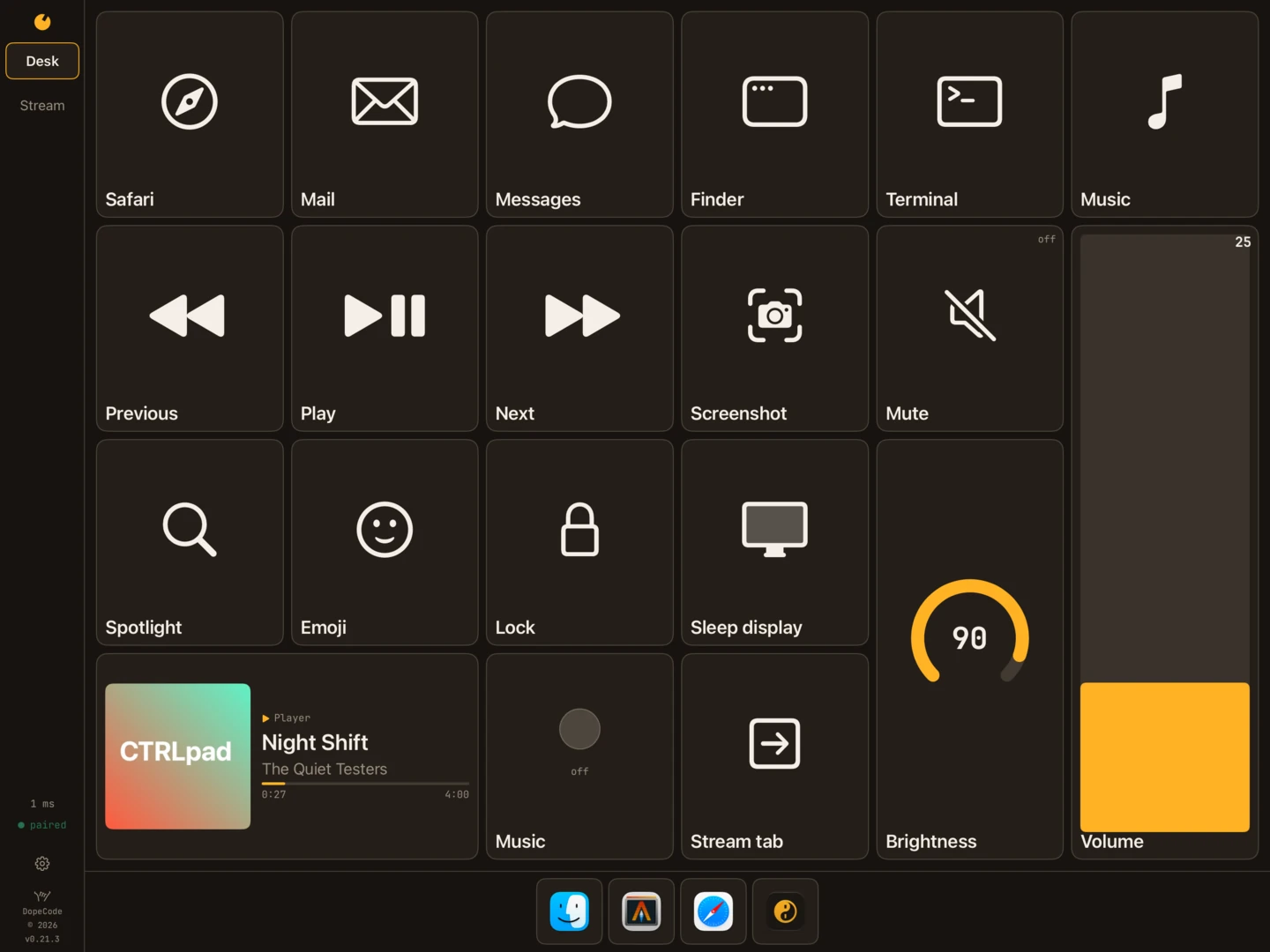
CTRLpad on an iPad in landscape, on the Desk tab: buttons for Safari, Mail, Messages, Finder, Terminal and Music, the media keys, Screenshot, Spotlight, Emoji and Lock, a Mute toggle, a Brightness knob at 90, a tall Volume slider, and the song Night Shift playing with its cover; the open apps are docked along the foot.
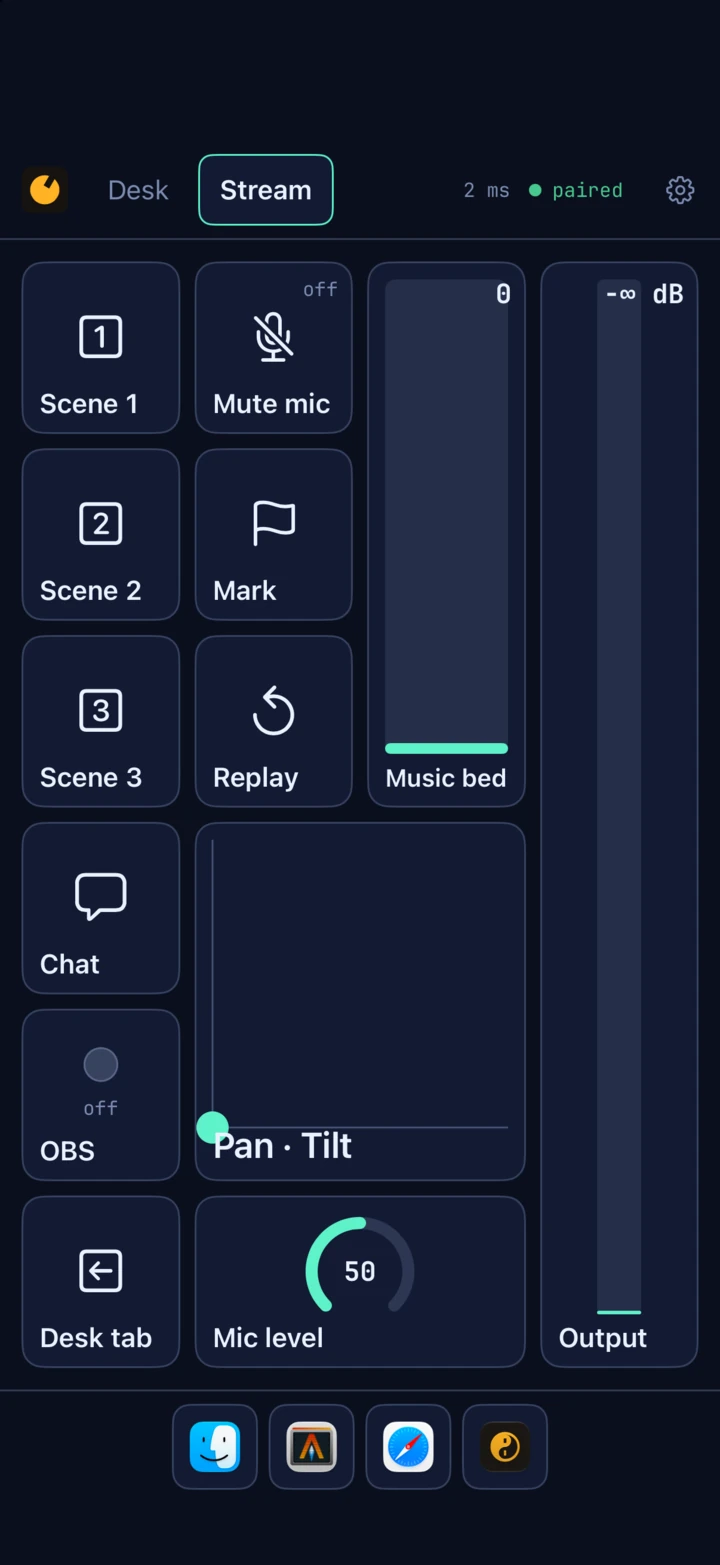
CTRLpad on an iPhone held upright, on the Stream tab in navy and mint: Scene 1 to 3, Mute mic, Mark, Replay, Chat, an OBS light, a Pan and Tilt pad, a Mic level knob and the Output meter, the grid turned to fit the phone.

Real screens. The decks it comes with.

Every picture on this page is CTRLpad itself: the designer on a Mac, and the pad in Apple's iPad and iPhone simulators, paired to it, on the decks File ▸ New Deck makes — Desk, Stream and the MIDI controller.

The song is invented: Night Shift by The Quiet Testers, put in the Mac's Now Playing with no sound behind it. The apps along the foot are the ones that were open on that Mac; CTRLpad keeps that row itself.

The deck

Laid out on the Mac, pressed on the pad.

A deck is tabs, and a tab is a grid. Drag a control where it goes, give it an action, and every paired pad has it a moment later. Close the designer and the pads keep working: CTRLpad lives in the menu bar.

The canvas is the pad.

  • The same view the iPad draws, inside an iPad or an iPhone outline, in landscape or portrait. Play runs every action from the Mac.
  • Nothing to know by heart. Press a key chord to record it, pick a symbol from a grid, give a button its app's own icon in one click, and try any action from the inspector without leaving the designer.
  • An editor that forgives. Every change is undone by name — Undo Resize Volume. What is in the way moves aside, a full tab grows a row to take what is added, and a move with no room says why.
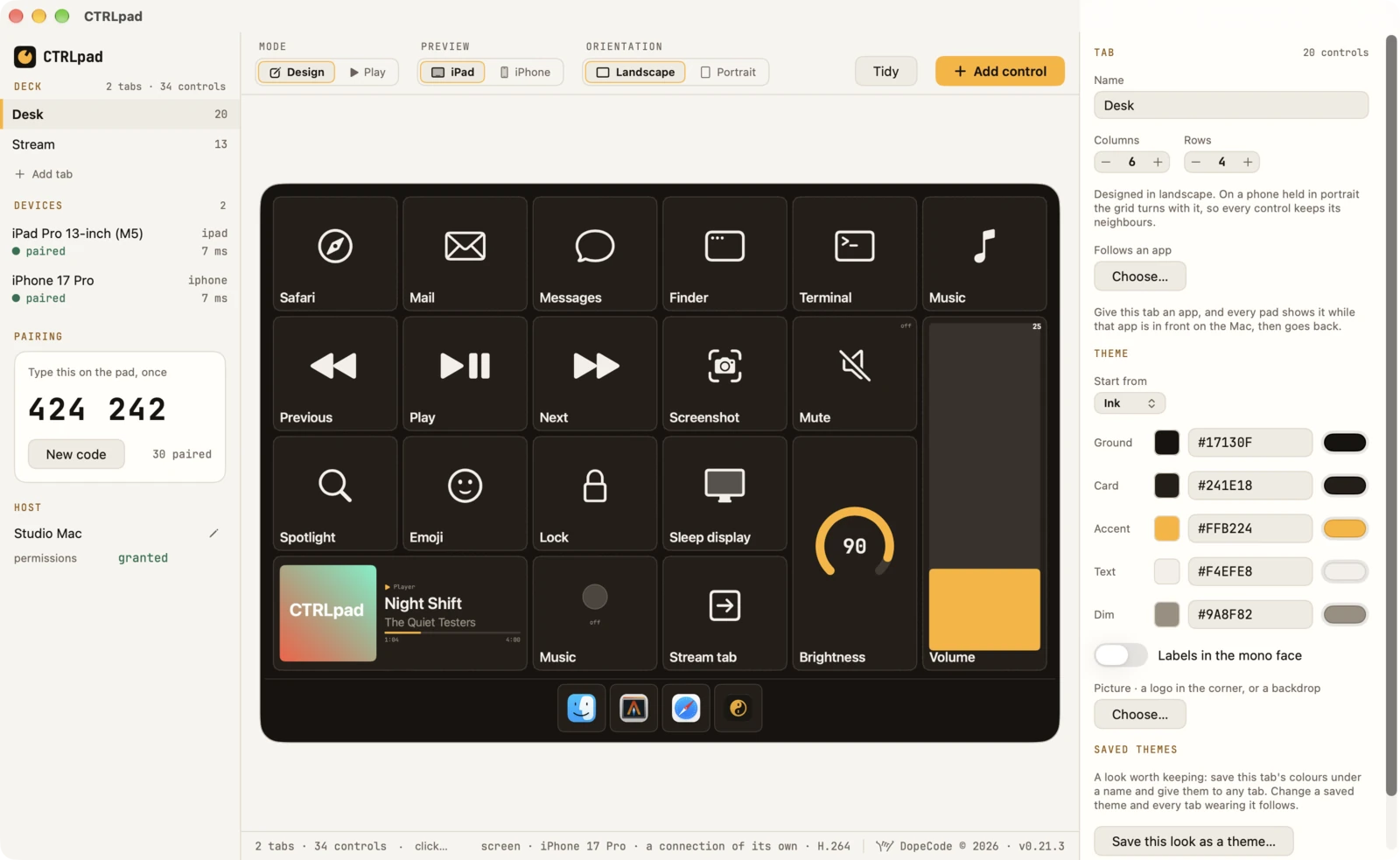
  • Each tab its own colours — ground, card, accent, text, a logo in the corner or a backdrop. A look saved under a name follows on every tab that wears it.
The CTRLpad designer on a Mac in the light theme: the Desk and Stream tabs and two paired pads in the sidebar with the pairing code 424 242, the Desk tab inside an iPad outline on the canvas, and the tab's name, grid and Ink theme colours in the inspector.

Thirteen kinds of control

ButtonFires on the touch, like a key; given a hold, a second action when the finger stays.
ToggleLatches, and reads its state back from the Mac.
Slider · KnobOne value a display frame; the volume and the brightness follow the Mac.
XY padTwo values from one finger: pan and tilt, two effects.
LED · LabelA light the Mac answers, such as whether an app is running; and words.
MeterThe level of what the Mac is playing, thirty times a second.
Button groupA row, a column or a grid of buttons — yours, or the ones the Mac keeps current.
PianoKeys played with every finger, louder struck near the front.
Now playingThe song, its cover, the artist and how far in.
Touch BarThe Mac's own, live, on a Mac without one.
ScreenThe Mac's display, live — and its mouse and keyboard.
And on any of themA label, an SF Symbol, a picture of your own — zoomed, panned, washed in a colour.

Twenty-six kinds of action

appsOpen an app; quit the one in front, one by name, or every one; run a shortcut from Shortcuts
keysA key chord; Escape, which cancels a screenshot being framed; text typed out; a media key
the MacThe volume, the brightness, the microphone muted and its level, the sound sent to an output, Wi-Fi and Bluetooth on or off, a Bluetooth device connected
scriptsA shell command, AppleScript, a URL
MIDIControl change, from a slider or pressed and let go; note; pitch bend; program change
the padSwitch tab; a macro of several; nothing
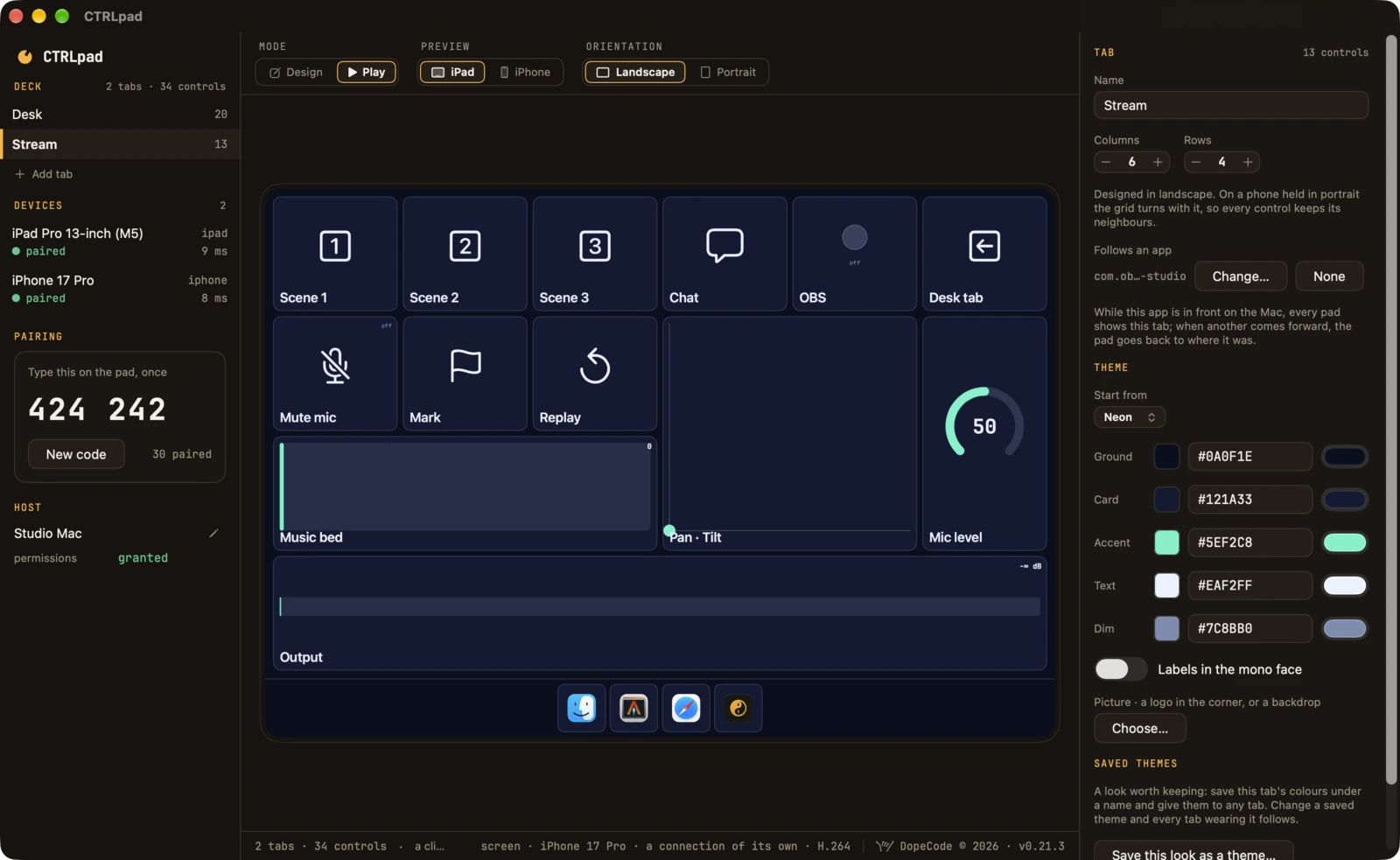
The CTRLpad designer on a Mac in the dark theme, in Play: the Stream tab in navy and mint on the canvas — scenes, Mute mic, Mark, Replay, Chat, a Pan and Tilt pad, a Music bed slider, a Mic level knob at 50 and the Output meter — with the open apps docked below and the tab's Neon colours in the inspector.
Play: a click on the canvas runs the control, on the Mac itself

iPhone & iPad

Designed wide, right on any screen.

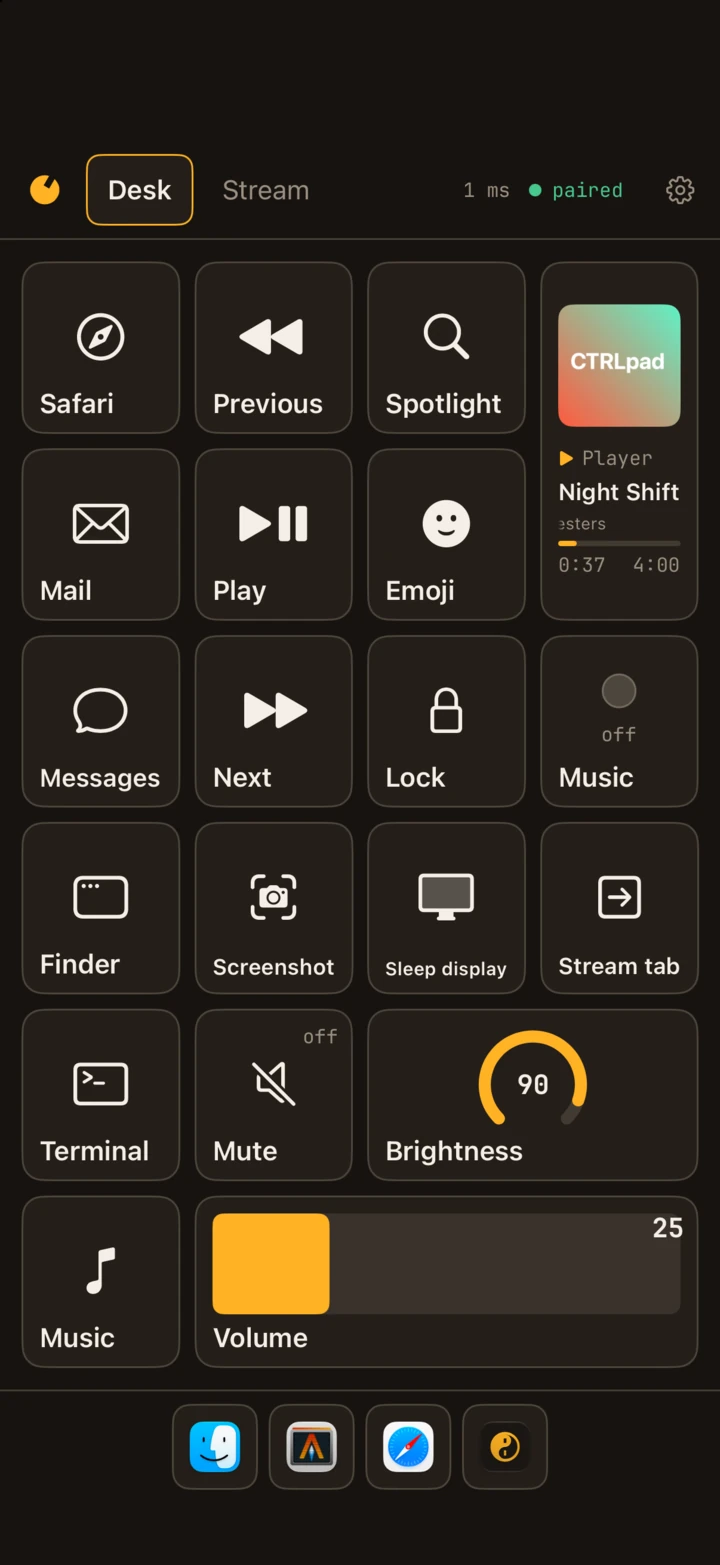
A tab is laid out in landscape. Held upright, the grid turns with the phone, so every control keeps its neighbours and nothing shrinks to a sliver.
A press is a key,
not a request.

  • A button fires the moment the finger lands, and the Mac's answer carries its own milliseconds, so the pad shows a round trip it measured.
  • The pad follows the Mac. Give a tab an app, and while that app is in front every pad shows the tab; switch away and the pad goes back to where it was.
  • The Mac's own values, mirrored. A slider on the volume or the brightness, a toggle on the microphone, follows the Mac whoever moves it — the keyboard, the menu bar, a call app's own mute button.
  • What is playing, from Music, Spotify, a browser: the cover, the artist, how far in. A title too long for its box scrolls, as a car radio's does.
  • Readable by VoiceOver. Every control says what it is and what it shows; a slider and a knob step with a swipe.
The Desk tab on an iPhone held upright: the six-by-four grid turned to four by six, Safari, Previous, Spotlight and Night Shift playing across the top, the Brightness knob and the Volume slider at the foot, and the open apps docked under them.

Rows of buttons the Mac fills itself.

A group is a row, a column or a grid of buttons: your own, and after them the ones the Mac makes and keeps current. Put one on a tab, or dock it at an edge, where it stays whichever tab is up.

  • Open apps. A tap brings one forward, a hold quits it; the one in front is lit.
  • All apps. Every app on the Mac by name, the open ones lit — Launchpad, on the pad. Installed or deleted, it is there or gone a moment later.
  • Sound. Mute, then every output Sound settings lists, the one in use lit.
  • Bluetooth & network. The radios, then each paired device, lit while connected.
  • Docked at an edge, a group can keep out of the way: put away by a grip, or hidden the way the Dock hides, over the grid and gone again by itself.
  • Too many to fit, it scrolls, the last one in view cut in half to say so — or shows them all, smaller.

A MIDI controller

Keys, knobs and pads, with no cable.

Everything comes out of the Mac's virtual MIDI source, CTRLpad, which any app that takes MIDI sees as a device: no driver, no cable. File ▸ New Deck ▸ MIDI controller is what a controller on a desk has, on three tabs.
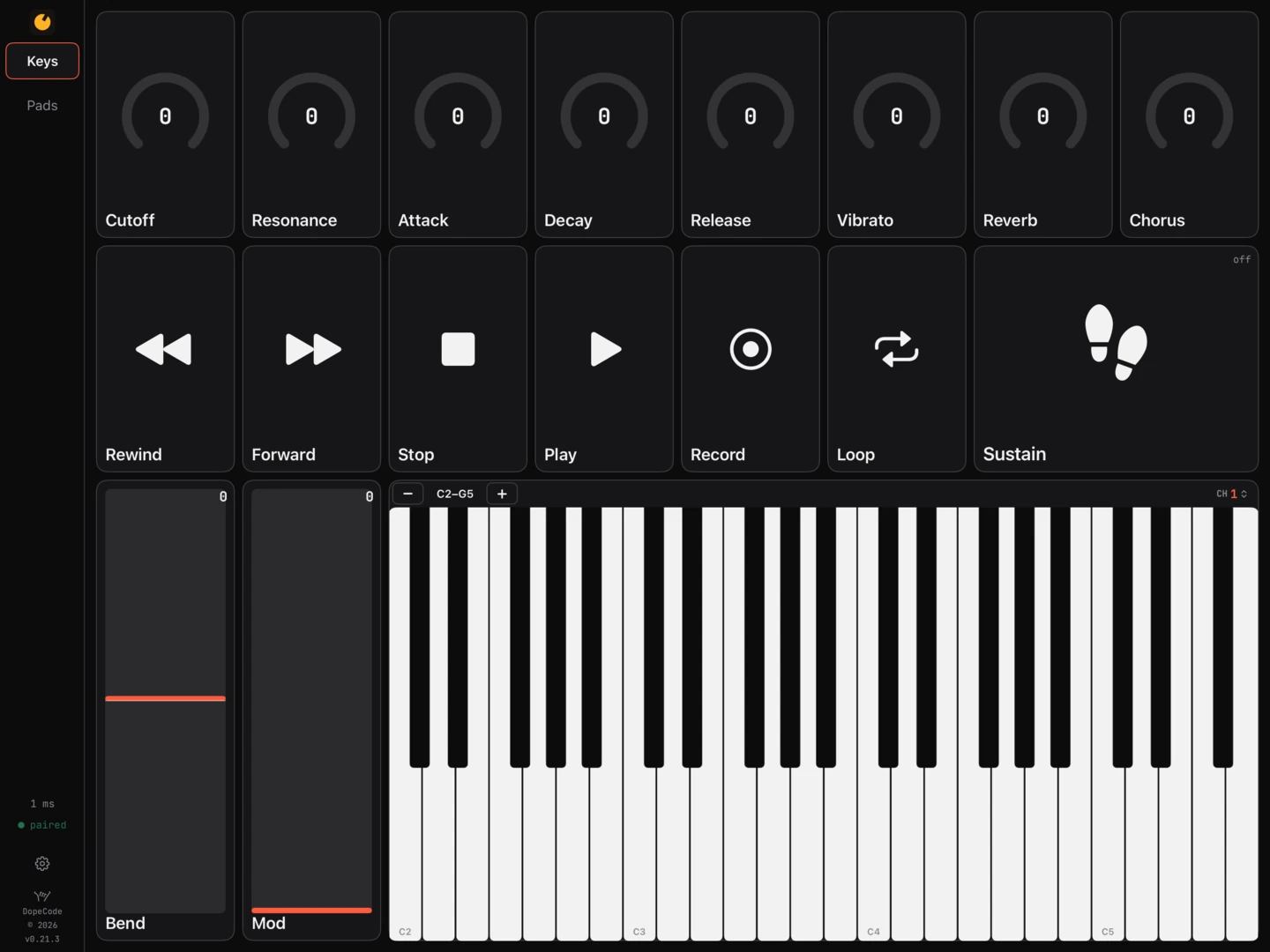
The Keys tab on an iPad in landscape: eight knobs — Cutoff, Resonance, Attack, Decay, Release, Vibrato, Reverb and Chorus — a row of transport buttons and a Sustain toggle, Bend and Mod wheels, and a piano from C2 to G5 with its octave and channel strip.

Each pad, a channel
of its own.

  • Keys. A piano played with every finger at once; a finger slid along it glides from key to key, and a key struck near its front is louder than one struck near the black keys. A strip across it moves it an octave either way and sets the pad's channel.
  • Wheels and knobs. A pitch bend that springs back to the middle, a mod wheel, and eight knobs on the General MIDI sound controllers many instruments answer with no mapping.
  • Mixer. Eight strips of pan, fader and mute, and a master.
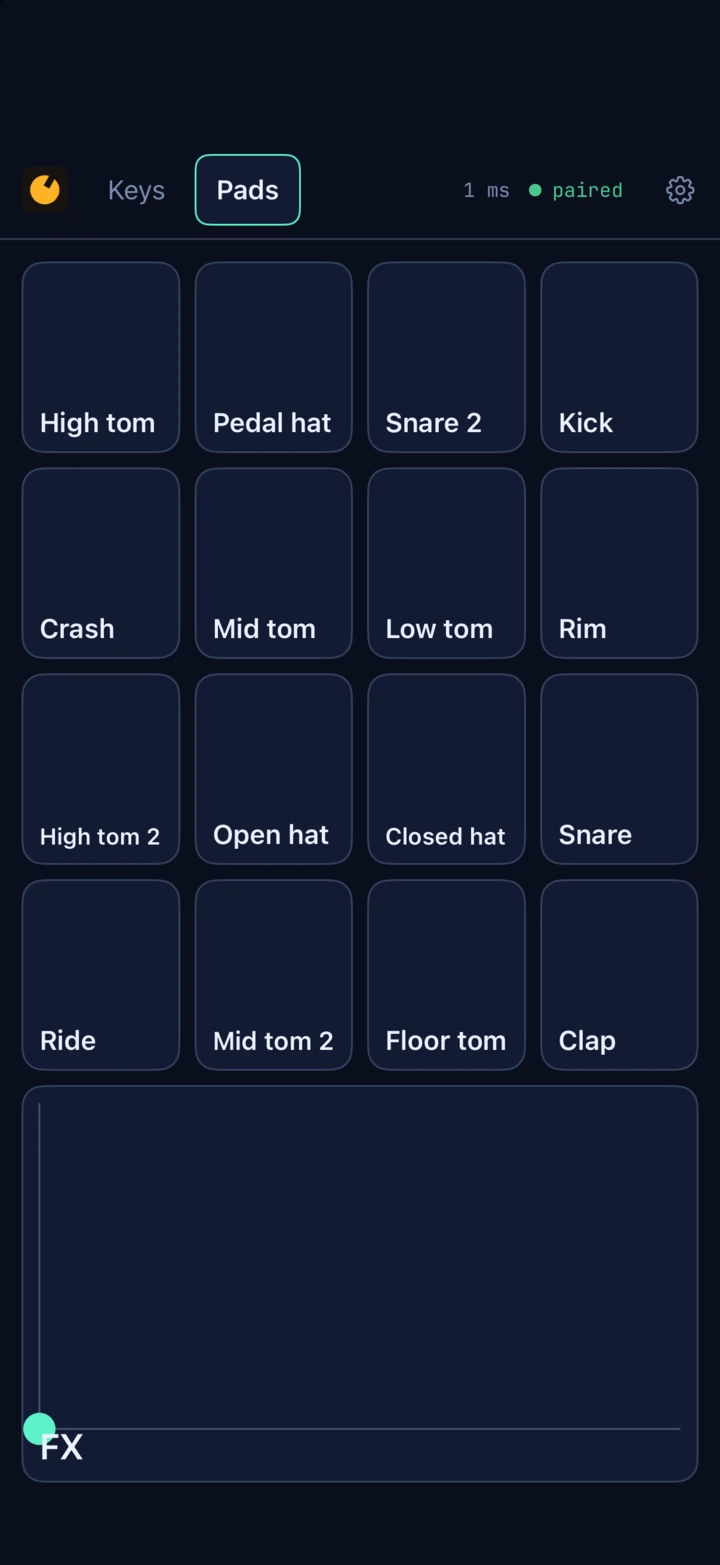
  • Pads. Sixteen drum pads on channel 10, laid out as Live's Drum Rack and Logic's Drum Machine Designer lay theirs — kick at the bottom left, 36 up to 51 — and an XY pad on two effects.
  • The channel moves with the pad. Every MIDI action that names none plays on the pad's, so the keys, the wheels and the knobs move to another instrument together, while the drums keep to ten. Two pads are two controllers.
The Pads tab on an iPhone held upright: sixteen drum pads from High tom and Crash down to Kick, Rim, Snare and Clap, and the FX pad under them.

The Mac itself, on the pad

Its screen, its mouse, its Touch Bar.

Two controls that are the Mac's own, live. Both run only while a pad, or the designer's Play, shows them.

The screen, and the Mac driven from it

A screen control shows the Mac's main display, the pointer on it, at the size that pad draws it — encoded in hardware for each pad, on a connection of its own so a press never waits behind a frame, and only when something on the screen changed.

  • A finger is the mouse. A tap clicks, twice is a double click, a finger kept still drags, two fingers right-click and scroll — a flick glides — and three swipe between Spaces.
  • A keyboard on the pad is the Mac's. One attached types each key as the Mac's own in the same place; the pad's own comes with a bar of function keys, Escape, Tab, the modifiers and the arrows.
  • Coloured text stays its colour on a pad whose chip decodes HEVC at 4:4:4; every other is sent H.264.

The Touch Bar, on a Mac with none

A Touch Bar control shows the bar of the app in front — its own buttons, sliders and scrubbers, and the Control Strip — as the Mac draws it, and a finger on it is a finger on the bar. Bring another app forward and its bar comes up.

  • A row that holds only the bar is only as tall as the bar; the rest of the tab takes the room.
  • File ▸ New Deck ▸ Touch Bar puts it across the foot of a tab under the open apps, so a tap on an app brings its bar up under your finger.
  • It asks for no permission. macOS keeps a Touch Bar on every Mac, for Sidecar; CTRLpad runs one while a pad shows it.

Measured

Fast, because of what is sent when.

A press is thirty bytes on a stream with no delay. It is decoded, carried out and answered on the connection's own thread, never waiting for the window. Sliders send one value a display frame.

1–4 msa press, there and back, the Mac's part under 1 ms
6–11 msa shell command run and answered
30 bytesa press on the wire, before it is sealed
4–7 Mbit/sa document scrolled on a screen control, 30 frames a second; a still screen, nothing

Round trips measured with the pad in Apple's simulator on the same Mac; a real network adds its own.

In a terminal

ctrlpad: a pad in a shell.

The model, the layout and the wire are a Rust library, and ctrlpad is a command line in front of it — pairing with a Mac and pressing its controls like a pad, from a script.

ctrlpad hostsThe Macs on the network
ctrlpad pair <host>Pair with the six digits, once
ctrlpad press <host> <id>One input, and the ran line back with the Mac's milliseconds
ctrlpad show --hostThe deck, with the Mac's own buttons and their keys
ctrlpad new --preset midiA ready-made deck: starter, apps, touchbar, screen, midi
ctrlpad check · layoutEvery rule a deck breaks; where its controls land on a screen

Privacy, itemised

Claims you can check.

The specific version, phrased so that you could go and verify it. The formal version is dopecode's privacy policy.

what it sends
Nothing to anyone but your own devices. No account, no server, no analytics, no crash reporter. The Mac and the pad find each other on the network they share and talk to each other, and to nothing else.
pairing
Six digits on the Mac, typed on the pad once. They never cross the network: both ends run SPAKE2 over them, so a listener learns nothing, and a stranger gets one guess a second, with new digits after three wrong.
every connection
Opens with a Noise handshake keyed by the pairing, and everything after it — the deck, the presses, the Mac's values, the screen — is encrypted and authenticated with ChaCha20-Poly1305. Forget a device from either end.
the screen
Captured only while a pad or Play shows a screen control, so the Mac's recording light means one is being looked at. Frames go to your paired pads, encrypted, and nowhere else; nothing is recorded.
the meter
Hears the Mac's output through System Audio Recording and keeps the loudest sample of each thirtieth of a second, as a height. Nothing is recorded.
what is playing
macOS answers its Now Playing only for Apple's own programs, so CTRLpad reads it through /usr/bin/perl with a small library of its own loaded into it — only while a tab shows a now-playing control and a pad or Play can see it.
permissions
Each only once something on the deck needs it: Local Network to find the pad, Accessibility for key chords and the mouse, Automation for AppleScript, System Audio Recording for a meter, Screen Recording for a screen, Bluetooth for a group of paired devices.

The honest part

What it does not do.

Better read here than found out afterwards.

Not in the app

  • Not out yet. There is no download and no App Store listing today; the foot of this page says how to hear when there is.
  • Not over the internet. The pad and the Mac find each other on the network they share, or peer to peer when they are near each other.
  • MIDI goes out, not in. Nothing from your music software moves a fader on the pad back.
  • No pinch or rotate on the Mac's screen: no public way exists to post a trackpad's pinch. Three fingers swiped are sent as Control and an arrow.
  • The main display only, of a Mac with more than one.
  • No Intel Mac. Apple silicon, macOS 15 or later.

Where the platform gets in the way

Accessibility and Screen Recording are given in System Settings, by you, and no installer can give them. macOS hands Screen Recording only to an app started after it is turned on, so CTRLpad offers to reopen itself.

The Mac app cannot be on the Mac App Store: it posts keystrokes, runs shell commands and is not sandboxed. The Touch Bar and what is playing come from parts of macOS Apple does not document, and an update to macOS can change them.

Help

The questions people ask.

How do I pair a pad with my Mac?

Open CTRLpad on the Mac, then on the iPhone or iPad, and pick the Mac from the list. Type the six digits the designer's sidebar shows, under Pairing. That is once: from then on the pad finds the Mac and connects by itself.

Do the Mac and the pad have to be on the same Wi-Fi?

On the same network, or near each other: with no network at all they reach each other peer to peer. Not over the internet. Both ask once whether CTRLpad may use the local network; it needs that answered yes.

A control says blocked.

The Mac has not given CTRLpad a permission that control needs, and the sentence with it says which: Accessibility for key chords, Escape, typed text and a screen's mouse; Screen Recording for a screen. Both are in System Settings ▸ Privacy & Security.

I allowed Screen Recording and the screen still says blocked.

macOS gives it only to an app started after it was turned on. The designer's sidebar offers Reopen CTRLpad; the pads reconnect by themselves.

How do I get the MIDI into Logic, Live or another app?

Choose CTRLpad as a MIDI input in the app's MIDI settings — it is there as soon as CTRLpad runs. Map a knob by the app's own MIDI learn: turn it on the pad.

Can I use two pads?

Yes, each paired once. Each shows the tab it is on, and each has a MIDI channel of its own, so two pads are two controllers.

Where is my deck kept?

On the Mac, in ~/Library/Application Support/CTRLpad/deck.json, with a copy of the deck as each day began, the last fourteen: File ▸ Restore from Backup brings one back. Export and Import move a deck between Macs, pictures and all.

Still stuck? Write to hello@dopecode.com with your CTRLpad version and what it said.

Mac · iPad · iPhone · not released yet

Not out yet.

CTRLpad is not released. Write to us and we will tell you when it is — the Mac app, and the pad for the iPhone and the iPad.

  • macOS 15 or later · Apple silicon
  • iPadOS 18 or later
  • iOS 18 or later

· Questions first? Help answers the common ones.